ALGORITHM & FLOWCHART MANUAL for STUDENTS
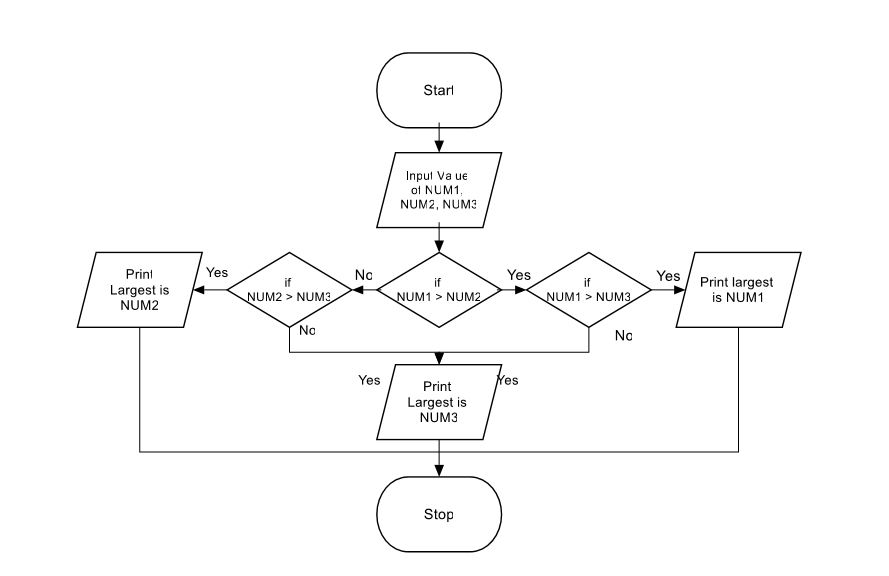
ALGORITHM:
The word “algorithm” relates to the name of the mathematician Al-khowarizmi, which means a procedure or a technique. Software Engineer commonly uses an algorithm for planning and solving the problems. An algorithm is a sequence of steps to solve a particular problem or algorithm is an ordered set of unambiguous steps that produces a result and terminates in a finite time
Algorithm has the following characteristics
• Input: An algorithm may or may not require input
• Output: Each algorithm is expected to produce at least one result
• Definiteness: Each instruction must be clear and unambiguous.
• Finiteness: If the instructions of an algorithm are executed, the algorithm should terminate after finite number of steps
The algorithm and flowchart include following three types of control structures.
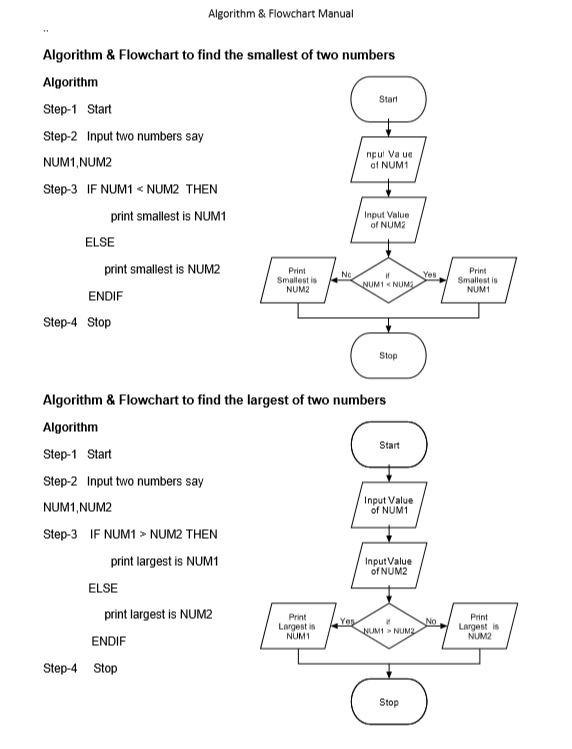
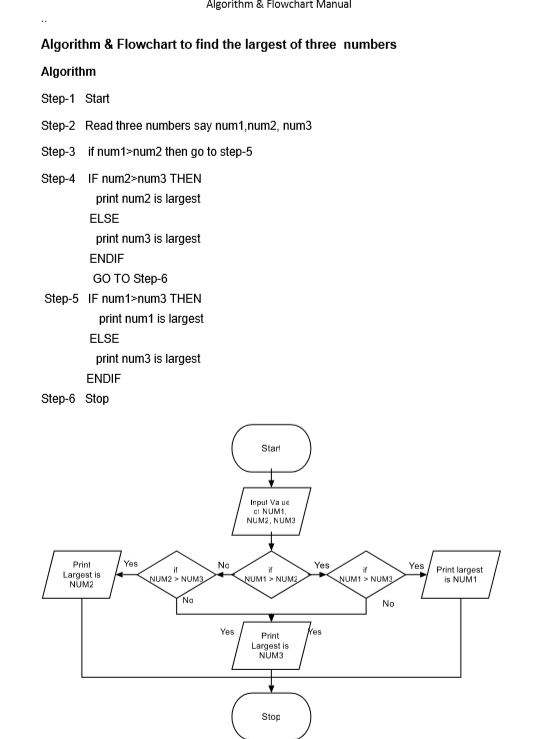
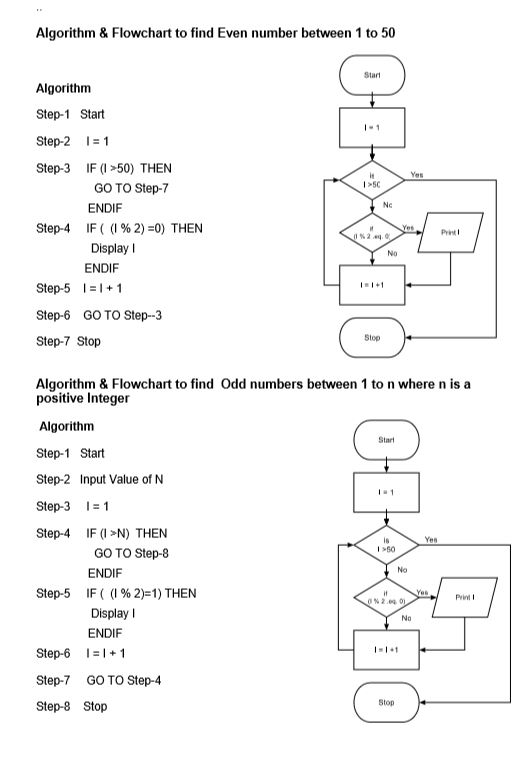
- Sequence: In the sequence structure, statements are placed one after the other and the execution takes place starting from up to down. 2. Branching (Selection): In branch control, there is a condition and according to a condition, a decision of either TRUE or FALSE is achieved. In the case of TRUE, one of the two branches is explored; but in the case of FALSE condition, the other alternative is taken. Generally, the ‘IF-THEN’ is used to represent branch control. 3. Loop (Repetition): The Loop or Repetition allows a statement(s) to be executed repeatedly based on certain loop condition e.g. WHILE, FOR loops.
Advantages of algorithm
• It is a step-wise representation of a solution to a given problem, which makes it easy to understand. • An algorithm uses a definite procedure. • It is not dependent on any programming language, so it is easy to understand for anyone even without programming knowledge. • Every step in an algorithm has its own logical sequence so it is easy to debug.
HOW TO WRITE ALGORITHMS
Step 1 Define your algorithms input: Many algorithms take in data to be processed, e.g. to calculate the area of rectangle input may be the rectangle height and rectangle width.
Step 2 Define the variables: Algorithm’s variables allow you to use it for more than one place. We can define two variables for rectangle height and rectangle width as HEIGHT and WIDTH (or H & W). We should use meaningful variable name e.g. instead of using H & W use HEIGHT and WIDTH as variable name.
Step 3 Outline the algorithm’s operations: Use input variable for computation purpose, e.g. to find area of rectangle multiply the HEIGHT and WIDTH variable and store the value in new variable (say) AREA. An algorithm’s operations can take the form of multiple steps and even branch, depending on the value of the input variables.
Step 4 Output the results of your algorithm’s operations: In case of area of rectangle output will be the value stored in variable AREA. if the input variables described a rectangle with a HEIGHT of 2 and a WIDTH of 3, the algorithm would output the value of 6.
FLOWCHART:
The first design of flowchart goes back to 1945 which was designed by John Von Neumann. Unlike an algorithm, Flowchart uses different symbols to design a solution to a problem. It is another commonly used programming tool. By looking at a Flowchartone can understand the operations and sequence of operations performed in a system. Flowchart is often considered as a blueprint of a design used for solving a specific problem.
Advantages of flowchart:
• Flowchart is an excellent way of communicating the logic of a program. • Easy and efficient to analyze problem using flowchart. • During program development cycle, the flowchart plays the role of a blueprint, which makes program development process easier. • After successful development of a program, it needs continuous timely maintenance during the course of its operation. The flowchart makes program or system maintenance easier. • It is easy to convert the flowchart into any programming language code.
Flowchart is diagrammatic /Graphical representation of sequence of steps to solve a problem. To draw a flowchart following standard symbols are use
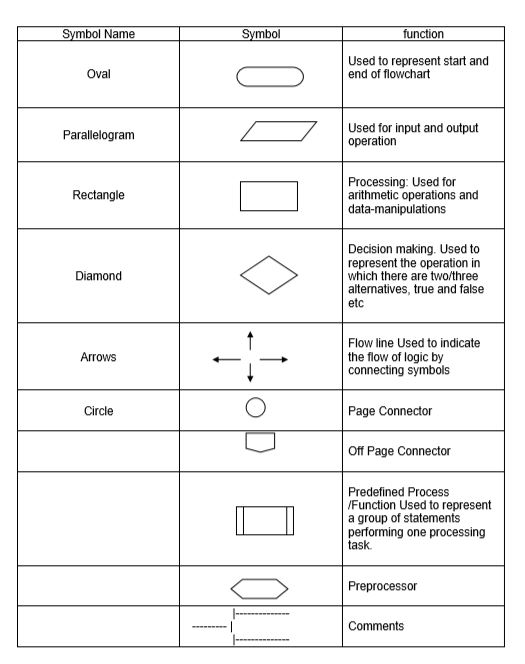
The language used to write algorithm is simple and similar to day-to-day life language. The variable names are used to store the values. The value store in variable can change in the solution steps. In addition some special symbols are used as below
Assignment Symbol ( or =) is used to assign value to the variable.
e.g. to assign value 5 to the variable HEIGHT, statement is
HEIGHT 5
or
HEIGHT = 5
The symbol ‘=’ is used in most of the programming language as an assignment symbol, the same has been used in all the algorithms and flowcharts in the manual.
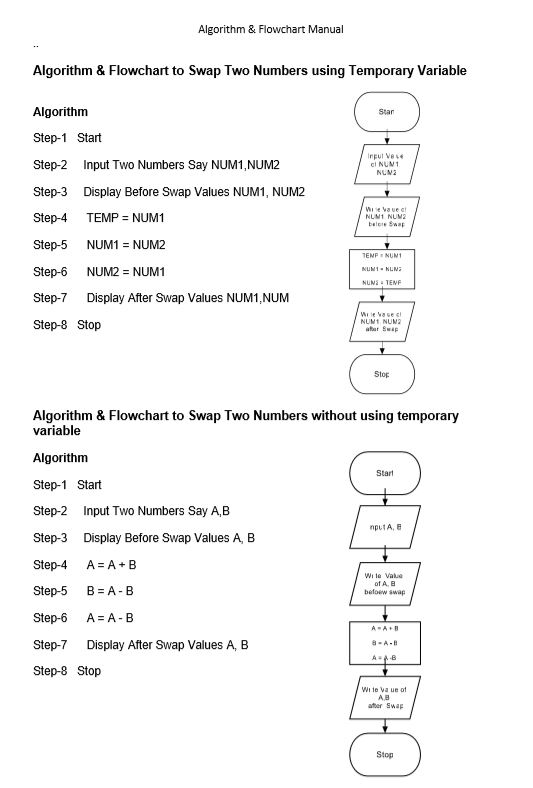
The statement C = A + B means that add the value stored in variable A and variable B then assign/store the value in variable C.
The statement R = R + 1 means that add I to the value stored in variable R and then assign/store the new value in variable R, in other words increase the value of variable R by 1
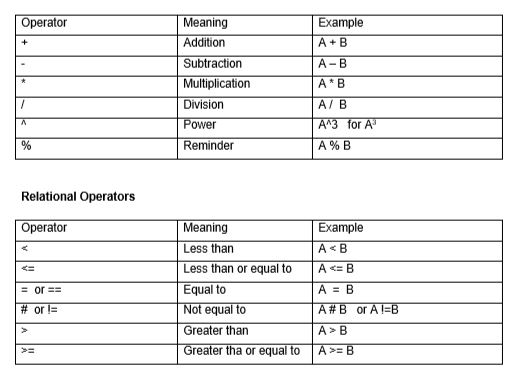
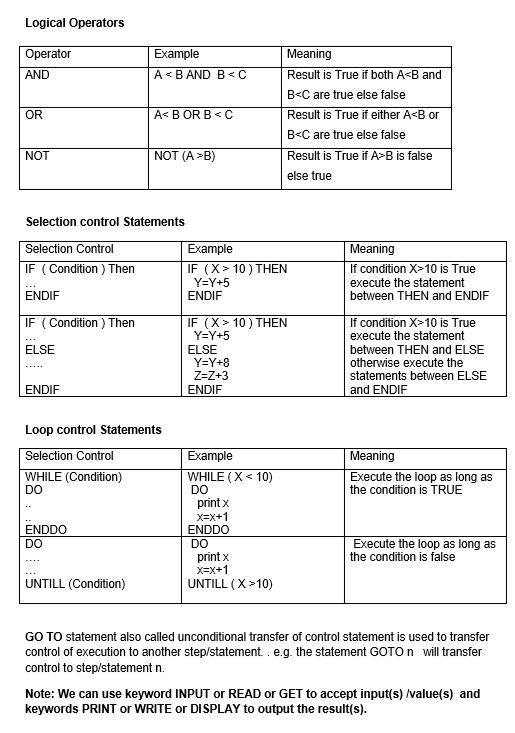
Mathematical Operators:
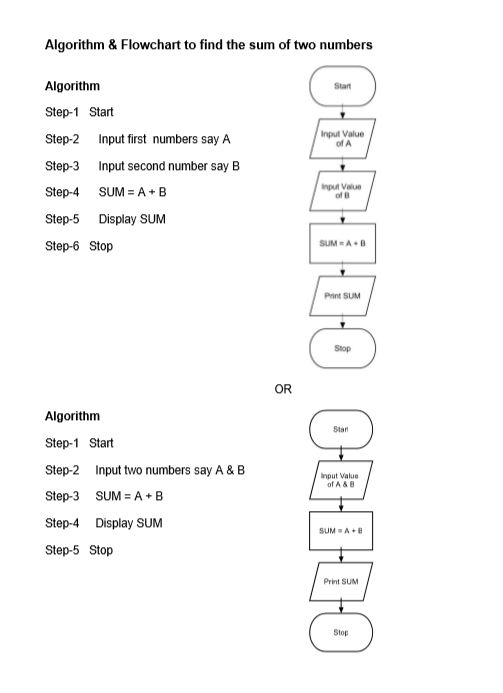
Algorithm
Step-1 Start
Step-2 Input first numbers say A
Step-3 Input second number say B
Step-4 SUM = A + B
Step-5 Display SUM
Step-6 Stop

 CODING SYNTAX